Expenses
An expense is a project cost that is not working hours: a trip, a licence, a rental, equipment… Each expense carries a planned amount (what you expect to spend) and, once it is known, an actual amount. The difference between the two is the deviation. An expense always belongs to a project and, optionally, to a specific phase or task.
Creating, editing and deleting expenses is for the owner PM. They can be seen by the owner PM and by anyone with full visibility of the project (a Director, PM or Team Leader who is a team member, and “entire organisation” members, such as a CEO). A Consultant/Developer never sees expenses, not even those of their own task.
There are two entry points to the same data: the project's Expenses tab and a task's Expenses tab.
Project expenses
In the project, the Expenses (n) tab lists all its expenses, from newest to oldest. When empty: “This project has no expenses logged yet.”
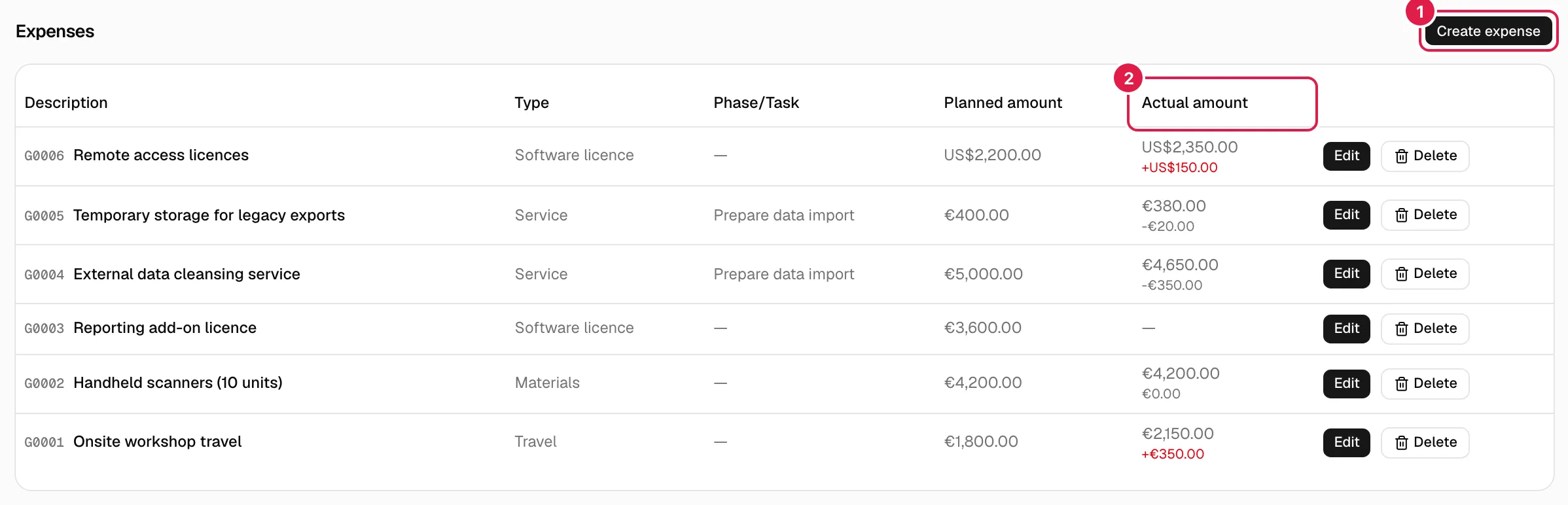
| Column | Content |
|---|---|
| Item | The expense code (G0001) and its description. |
| Type | Expense type from the catalogue. |
| Phase/Task | The task if there is one; otherwise the phase; otherwise “—”. |
| Planned amount | Formatted in its own currency. |
| Actual amount | Formatted in its currency, or “—” if there is none. The deviation appears below it. |
Deviation
It is actual amount − planned amount, calculated in a single place. It only appears if there is an actual amount (without one there is nothing to compare; 0 is not assumed). If it is positive (more was spent than planned) it shows with “+” and in red; if it is zero or negative, in grey. Example: planned €1,200.00, actual €1,350.00 → “+€150.00” in red.
Log an expense
Only the project's owner PM.
- On the Expenses tab, press Create expense.
- Fill in the Log expense dialog and press Log expense.
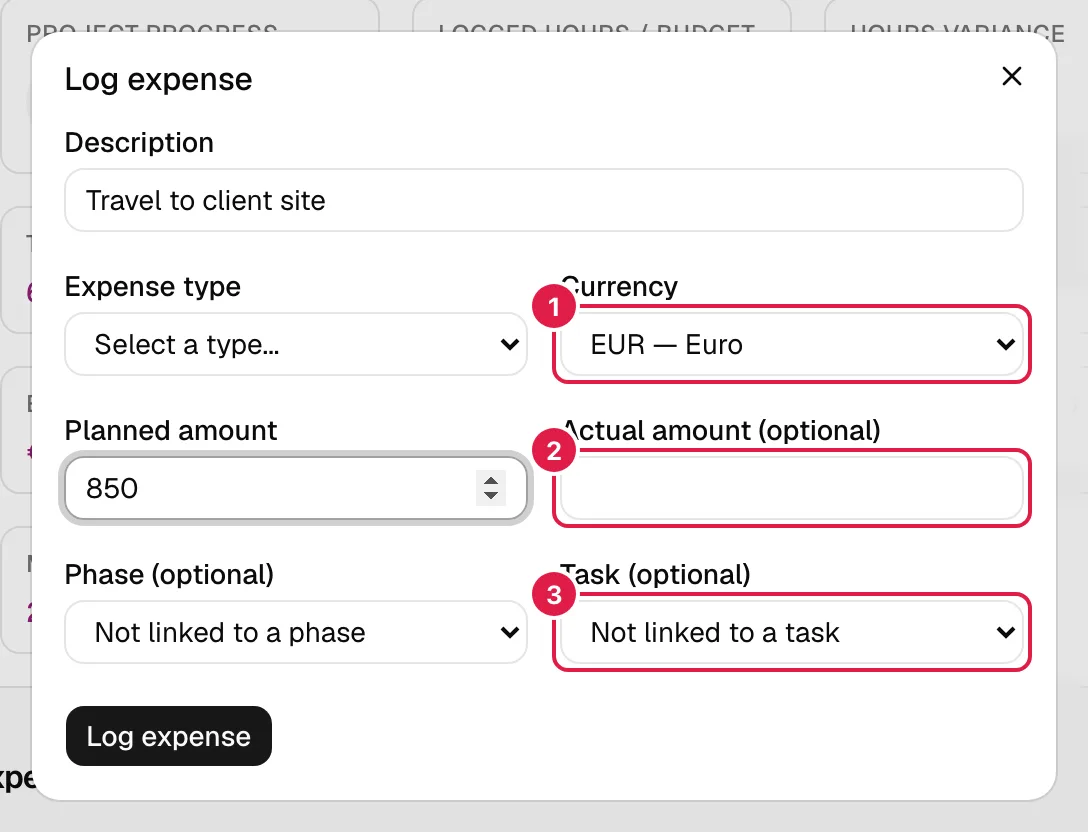
| Field | Meaning and validation |
|---|---|
| Item | Required: “The description is required.” |
| Expense type | Required: “The expense type is required.” List from the organisation's catalogue (Master data and catalogues). |
| Currency | By default, the project's; you can choose another from the catalogue. Each expense stores its own. |
| Planned amount | Required, ≥ 0, up to two decimals: “The planned amount is required.” / “The planned amount must be a number equal to or greater than 0.” |
| Actual amount (optional) | ≥ 0 or empty. Empty means “no actual amount yet”, which is different from 0. “The actual amount must be a number equal to or greater than 0.” |
| Phase (optional) | “Not linked to a phase” or any phase or sub-phase of the project (sub-phases appear with “— ”). |
| Task (optional) | “Not linked to a task” or a task of the project, grouped by phase. |
Phase and task are linked. When you choose a task, the phase drop-down is locked and set to that task's phase; when you go back to “Not linked to a task”, it is released. The server always enforces this: if there is a task, the stored phase is the task's. An expense with neither phase nor task is a general project expense.
Edit and delete an expense
Only the owner PM. Everyone else sees the table without the buttons.
- Edit opens Edit expense with the same fields already filled in. Use it to record the actual amount when the invoice arrives, or to correct it. If you empty the actual amount, it goes back to “no actual amount”. The planned amount cannot be left empty.
- Delete asks “Are you sure you want to delete this expense?” and removes the expense permanently. It takes nothing else with it.
- If you delete a task or a phase, its expenses are not deleted: they stay in the project without that link.
- The expense type and the currency can only be existing values of your organisation (“The selected expense type doesn't exist.”, “The selected currency doesn't exist.”).
Expenses of a task
The Expenses tab on a task's page shows only the expenses linked to it, with the line “Phase: …” (informational: the phase is always the task's).
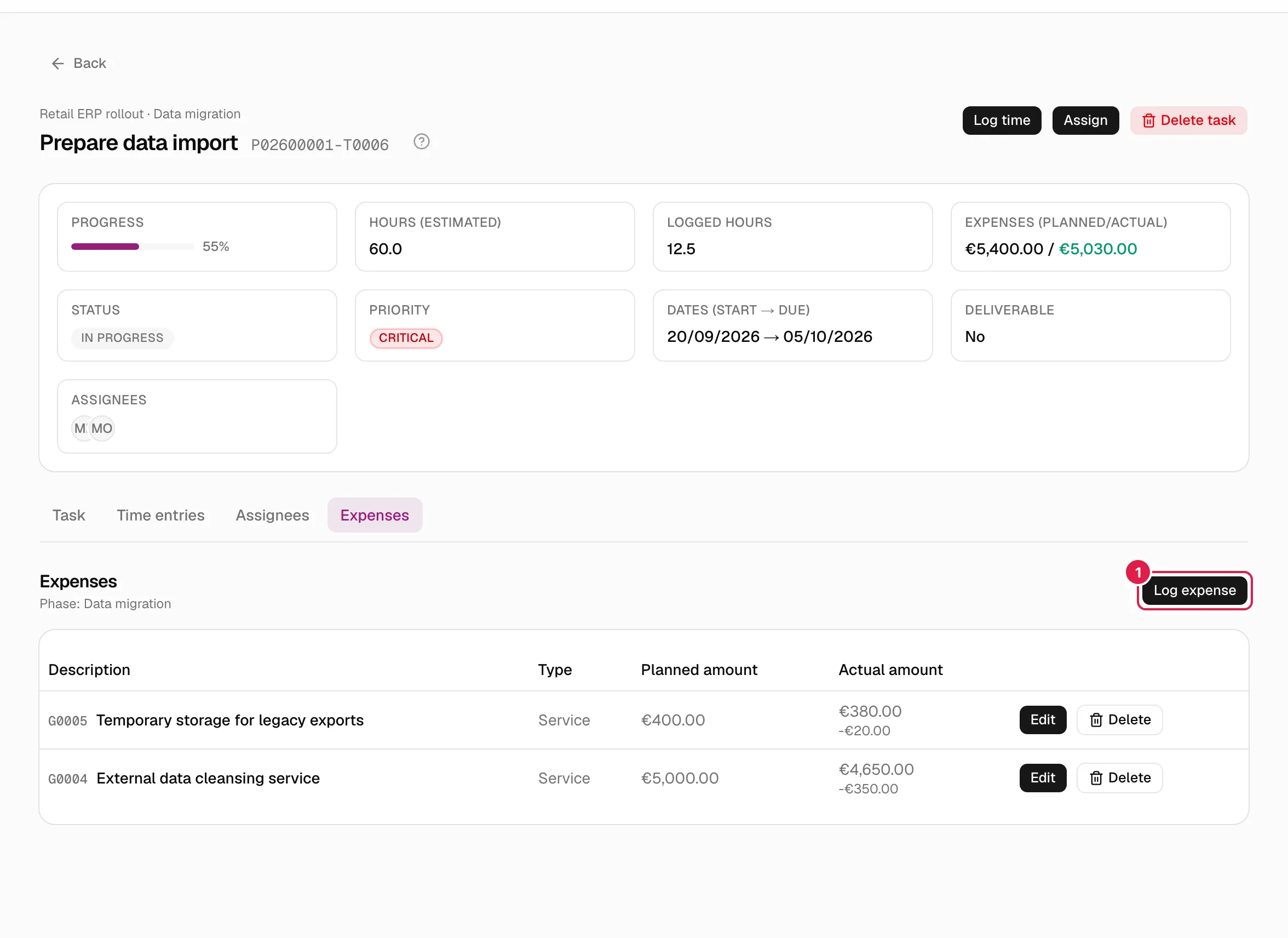
The Log expense for this task dialog is the same without the phase and task selectors (they are fixed). The table has no phase/task column. Editing and deleting work the same way, and editing never changes the expense's task. With no expenses: “This task has no expenses logged yet.”
The tab only appears for people with full visibility of the project; if someone reaches it by address without that permission, they see “You don't have access to this project.”
Totals and amount formatting
- On the task page, the Expenses (planned/actual) card adds up the task's expenses: “€1,800.00 / €1,950.00”. It only shows if there are expenses. In the project summary, the Expenses card does the same with all of the project's expenses. And in the phases' task table, “Expenses: …” appears.
- The actual total adds up the expenses that already have an actual amount (it does not wait until all of them do). If none has one, only the planned amount is shown.
- The actual part of the total is coloured: red if it exceeds the planned amount, green if it is equal or below.
- Each amount is formatted with its own currency and the interface language (separators and symbol position): in English (British) €1,234.50; in German 1.234,50 €. The currency is never converted.
Who can do what
| Action | Owner PM | Director / Team Leader (not owner) | CEO (entire organisation) | Consultant/Developer |
|---|---|---|---|---|
| See expenses (tabs and totals) | Yes | Yes | Yes | No |
| Create, edit, delete | Yes | No | No | No |
Related topics
- Tasks
- Master data and catalogues (expense types and currencies)
- Project summary
- Create a project (the project's currency)
Updated 2026-10-08