Change requests
A change request is a request that falls outside the agreed scope of the project (a new feature, an extra report, a change of mind by the client). Logging it gives you a record of who asked for it, how much it would cost and what you decided, before it goes into the planning.
It belongs to a project (not to a specific phase or task) and has a short code, for example S0002, unique within the project.
It is visible to the owner PM, to the project's level 1-2 members (Director, PM, Team Leader) and to CEOs; the status selector is only active for the owner PM. A Consultant/Developer has no access.
The Change requests tab
In the project, the Change requests tab (with its count) lists the requests, most recent first.
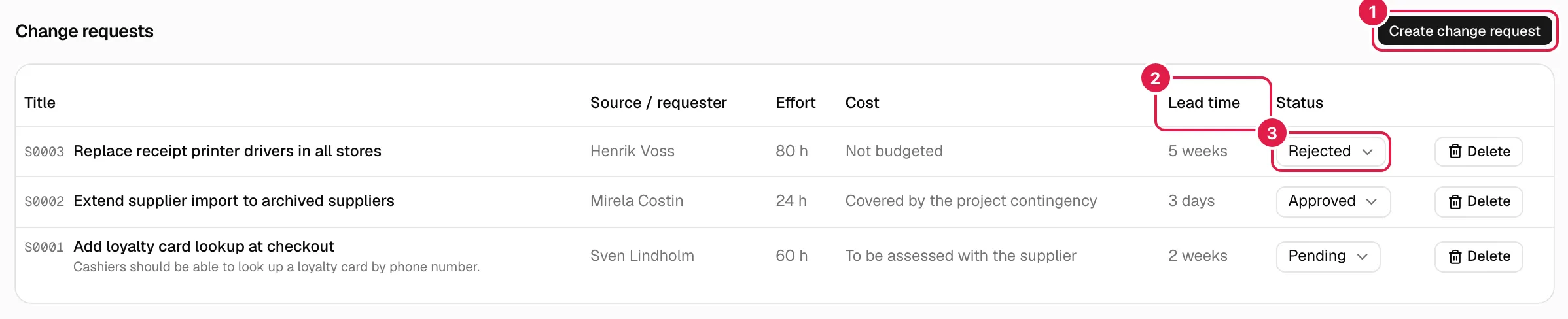
| Column | What it shows |
|---|---|
| Title | Code, title and description if there is one. |
| Source / requester | Who is asking for it (free text). |
| Effort | Estimated hours, with “h” (for example “24 h”), or “—”. |
| Cost | Free text or “—”. |
| Lead time | Free text or “—”. |
| Status | Selector with Pending, Approved or Rejected. |
With no requests: “This project has no change requests logged yet.”. The table has no filters.
Create a change request
Only the project's owner PM.
Press Create change request. In the Log change request dialog:
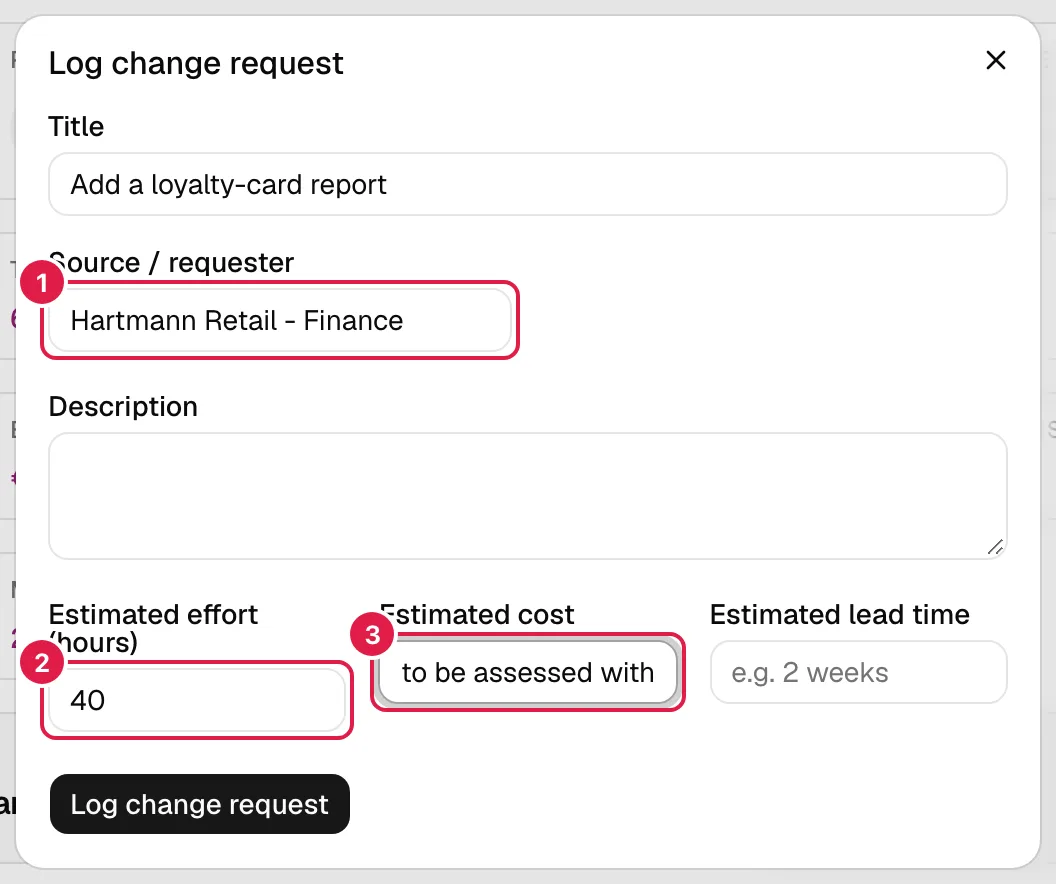
| Field | What it means |
|---|---|
| Title (required) | Summary of the change. |
| Source / requester (required) | Who is asking for it: a person, a department, the client… It is free text; it does not have to be a PjMan user. |
| Description | Detail of what is being requested. |
| Estimated effort (hours) | A number of hours, with halves (step 0.5). Optional; cannot be negative. |
| Estimated cost | Free text, not an amount: it allows things like “to be assessed with the supplier”. PjMan does not add up or convert this cost. |
| Estimated lead time | Free text, for example “2 weeks”. |
You do not choose the status when creating: every request starts as Pending. Errors: “The title is required.”, “The source/requester is required.”, “Estimated effort must be a number equal to or greater than 0.”, and “Only a PM can perform this action.” / “You don't have access to this project.” if you are not the owner PM.
Approve or reject
The flow is a simple approval: Pending → Approved or Pending → Rejected. You decide with the selector in the Status column: when you choose an option it is saved instantly, with no save button. You can change it again whenever you like (for example from Rejected back to Pending); there is no history of decisions or of who decided.
If saving fails, a pop-up notice shows the reason. For anyone who is not the owner PM, the selector is disabled.
Edit a request
From the screen, only the status can be changed. Title, requester, description, effort, cost and lead time have no edit form. To correct them you can ask the assistant (it proposes changing the title, status, effort, cost or lead time and asks for confirmation; the requester and the description are not part of that edit) or delete the request and create it again.
Delete a request
Only the owner PM.
Press Delete on the row and confirm “Are you sure you want to delete this change request?”. It is permanent and affects nothing else.
Who can do what
| Action | Owner PM | Project Director / PM / Team Leader, and CEO | Consultant/Developer |
|---|---|---|---|
| See the tab | Yes | Yes (read-only) | No |
| Create | Yes | No | No |
| Change the status | Yes | No (selector disabled) | No |
| Edit other fields | Only with the assistant | No | No |
| Delete | Yes | No | No |
Related topics
Updated 2026-10-08