Daily suggestions
Every day the assistant can review your projects and leave you a short, prioritised list of recommendations: tasks worth attending to today, deviation risks and pending follow-ups. It appears in a block on the Projects screen (all your projects) and in the summary of each project (that project only). They are suggestions for you: the assistant does not execute anything and sends nothing on its own.
This is exclusive to PM accounts with an AI key. A Consultant/Developer or an “entire organisation” member (CEO) sees neither the block nor the setting. Only projects for which you are the owner PM are analysed; you neither see nor generate suggestions for another PM's projects.
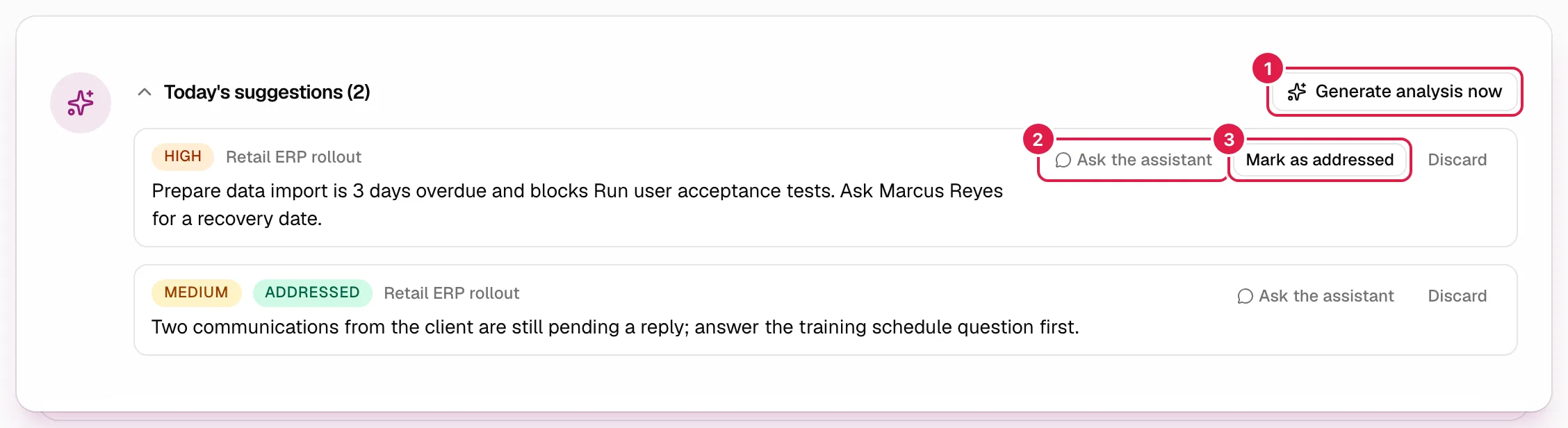
What each suggestion contains
Each suggestion is one or two concrete sentences with a priority (High, Medium, Low, with its colour), sorted from highest to lowest priority. In the general block, the name of the project it refers to also appears. The assistant generates up to 8 per project from the real state of things: overdue and blocked tasks, dependencies, open risks, open issues, change requests, and whether the suggestions from previous days were acted on. It also stores a brief summary of the project that serves as its memory for the next day's analysis. It does not invent data: if there is nothing relevant, it may return an empty list.
When they are generated
- Automatically, once a day per project. When the automatic analysis is switched on (see below) and you have a key, PjMan generates the analysis for your day (according to your time zone) in the first daily run that takes place each day. The setting describes it as “every morning at 06 (your local time)”; in practice the exact time may vary slightly depending on when the run happens, but it is once a day per project and the same day is never repeated.
- Manually, with the Generate analysis now button (in the general block it analyses all your projects; in a project's block, only that one). You can repeat it whenever you like; each press consumes tokens from your key.
- If a project fails (for example, your key stopped being valid), the rest carry on. In the general block, if none could be generated you see the first error as a notice; if at least one was, it counts as successful. Usual messages: “Set up your AI key in Settings to generate suggestions.”, “Your Anthropic key isn't valid. Check it in Settings.”, “Your Anthropic key has reached its request limit. Please try again later.”. If all goes well: “Analysis generated.”.
Switching the automatic analysis on or off
In Settings → Assistant, tick or untick Generate the daily analysis automatically (it applies instantly). Switching it off only removes the automatic generation: Generate analysis now and the assistant chat keep working exactly as before. Without an AI key nothing is generated. The state in each case:
| Situation | What you see in the block |
|---|---|
| No AI key | “You haven't set up your AI key yet.” followed by the description and a Set it up in Settings link “to turn on the assistant.” |
| With a key and no suggestions for today | “No suggestions for today yet.” (plus the description), with the Generate analysis now button |
| With suggestions | The suggestion counter in the title, the button and the list. The block starts collapsed and remembers in your browser whether you expand it (per project). |
The daily analysis follows the same cost rules as the rest of the assistant: it shows up under “Last analysis” on the usage card (Your own Anthropic key).
What you can do with each suggestion
| Button | What it does |
|---|---|
| Ask the assistant | Opens the panel with that suggestion attached (“About: suggestion for {project}: “…””) so that you can ask what to do, ask for more detail or turn the recommendation into tasks. The suggestion is sent as third-party content (because it is generated text), so any later creation will ask for a confirmation card. See Attaching content. |
| Mark as addressed | Marks it with the green Addressed label and removes this button. It acts as memory for the next analysis (the assistant will see whether you followed up on yesterday's). Possible error: “It couldn't be marked as addressed.” |
| Discard | Asks you to confirm (“Discard this suggestion? You won't be able to undo it.”) and deletes it permanently. Also available on those already addressed. Possible error: “The suggestion couldn't be discarded.” |
Only today's suggestions are shown (the day in your time zone): when the day changes, the new ones appear and the previous ones are no longer shown.
Who can do what
| Action | Owner PM | Another PM | Consultant/Developer and “entire organisation” members |
|---|---|---|---|
| See the general block (Projects) | Yes, for their projects | Does not see those of another PM | No |
| See and use a project's block | Yes | Does not see other people's projects | No |
| Generate, mark and discard | Yes, in their projects | Not in other people's projects | No |
| Switch the automatic analysis on/off | Yes | Yes, their own | The setting does not appear |
Related topics
Updated 2026-10-08