Queries
Queries (main menu) is the tool for seeing the work of all your projects at once, filtering it and taking it to Excel. It answers questions such as “which tasks are overdue across the whole portfolio?”, “which critical issues are still open?” or “how many hours did Marta Ortega log in September?”. It has three tabs: Tasks, Time entries and Issues.
Only the PM (within their scope) and organisation members with a team role marked “whole organisation” (for example, a CEO; see Organisation members (CEO)) can get in. A Consultant/Developer sees “You don't have access to this section: it's only for PMs and organisation members (team role marked “whole organisation”, e.g. CEO).”. Their personal view is My work. Access is also checked on the server, export included.
What data each person sees
| Who | What the tables include |
|---|---|
| PM | Tasks and issues of the projects they see in full (their own and those where they are in the team at Director or Team Leader level), plus any directly assigned to them in other projects |
| “Whole organisation” member (CEO) | Everything in all the organisation's projects |
The Project selector offers “All my projects” (PM) or “All organisation projects” (CEO) and the list of projects in that scope. If someone else's project is typed into the address by hand, it simply returns no rows: it is never widened to the full scope.
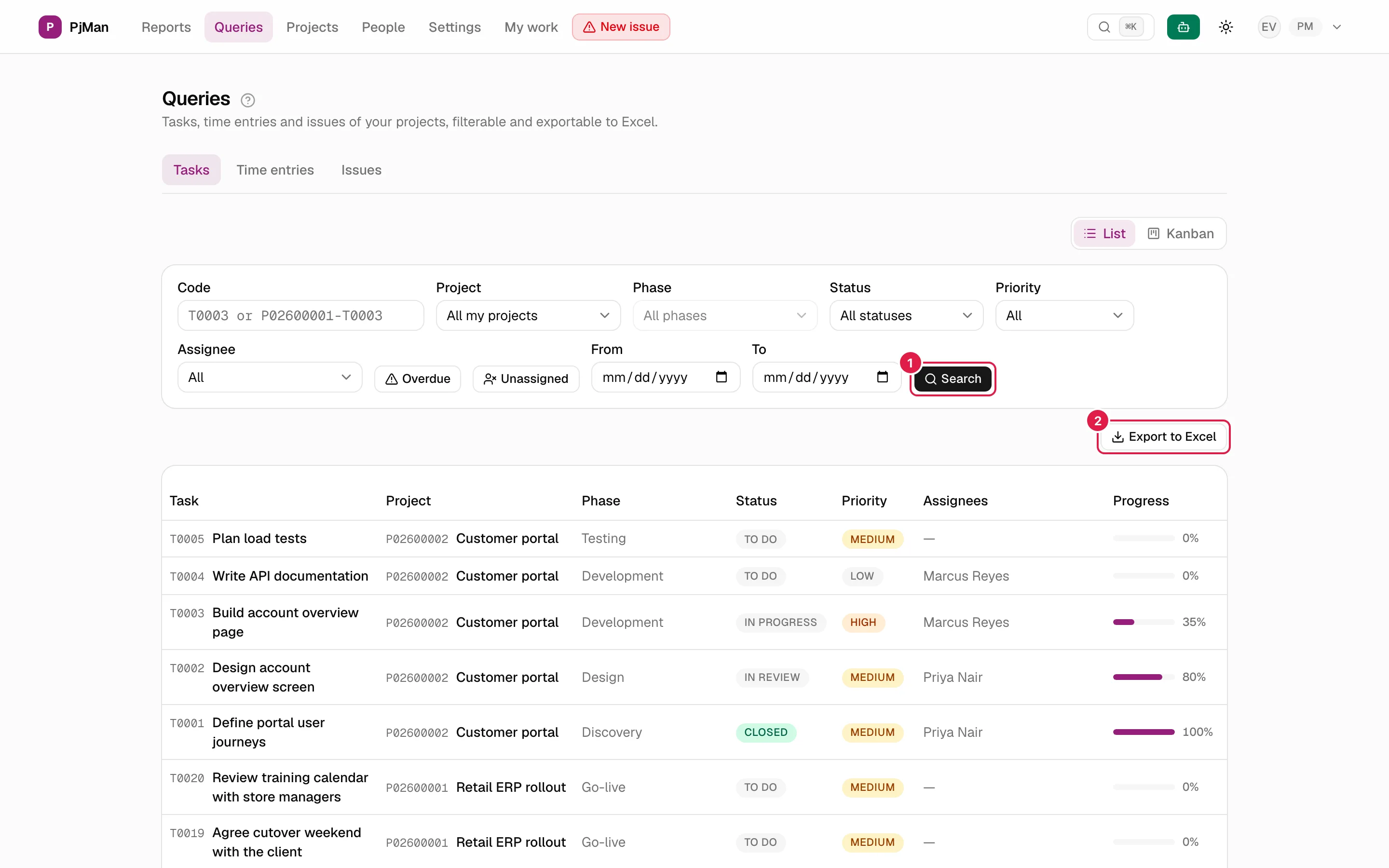
How searching works: the “Search” button
All the filters are a draft: changing them changes nothing until you click Search (or press Enter in the code field). When you open the tab nothing is queried and you read “Adjust the filters and press Search to see results.”. This is deliberate: a query over “the whole scope” is heavy, so you only run it when you need it.
- The filters are saved in the page address (URL parameters), so you can bookmark a search or send it to a colleague with the same role.
- With results, the table has a limited height and scrolls inside.
- With no results: “No tasks match these filters.” (or issues / time entries). If there are no active filters and there is still nothing: “You haven't created any tasks yet.” / “You haven't created any issues yet.”.
Tasks tab
Route /consultations. Table columns: full code, task, project, phase, status, priority, assignees, hours (logged / estimated), dates (start → due), progress and deliverable. To the right of the title there is the List | Kanban switch (see Kanban boards); when you switch to Kanban the chosen project is kept.
Task filters, one by one
| Filter | What it does |
|---|---|
| Code | Accepts T0003 (that task in any project), P02600001 (all the tasks in that project) or P02600001-T0003 (one exact task) |
| Project | Restricts to one project; changing it clears the phase |
| Phase | Disabled while there is no project (“Select a project”); lists the project's phases and sub-phases (indented) |
| Status | By status name (statuses are per project: “In progress” counts in every project that has a status with that name). Only statuses that exist in the chosen scope appear |
| Priority | Low, Medium, High or Critical |
| Assignee | One person, with or without an account. Only people with at least one task in the scope appear |
| Overdue | A toggle button: due date before today and a non-final status (it does not depend on the “Finished” tick box) |
| Unassigned | Button: tasks with no assignee at all |
| From / To | Due date range (both inclusive). A task with no due date drops out as soon as either one is filled in |
The filters combine with “and”. “Overdue” and “Unassigned” together give the overdue tasks that also have nobody assigned.

Time entries tab
Route /consultations/time-entries. Table of the hours logged on the scope's tasks and issues. Its filters are Code, Project, Phase, Person (whose hours they are), Logged by, From and To; by default it shows the last 90 days. It is described in detail in Time entries. It is exported like the other tabs.
Issues tab
Route /consultations/incidents. Table with code, title, project, phase, status, severity, priority, assignees, hours, and detection and closing dates. It also has the List | Kanban switch.
| Filter | What it does |
|---|---|
| Code | I0003, P02600001 or P02600001-I0003 |
| Project / Phase | As for tasks. An issue's phase is its own or, if it has none, that of its linked task |
| Status | By name, from the organisation's issue status catalogue |
| Severity | Low, Medium, High or Critical |
| Assignee / Unassigned | As for tasks |
| From / To | Detection date range (both inclusive) |
There is no “overdue” or priority filter on this tab.
Exporting to Excel
The Export to Excel button (top right of each tab) downloads an .xlsx file with exactly what you see in the table: it uses the same filters as the last search run, not those you have half-set in the draft. It is disabled until you click Search. If you change a filter and do not click Search, the file is still the one from the previous search.
| Tab | Sheet | File name | Columns |
|---|---|---|---|
| Tasks | Tasks | tasks_YYYY-MM-DD.xlsx |
Code (full, P02600001-T0003), Task, Project, Phase, Status, Priority, Assignees, Start → due, Hours, Progress, Deliverable |
| Time entries | Time entries | time-entries_YYYY-MM-DD.xlsx |
Code, Person, Project, Task / Issue, Date, Hours |
| Issues | Issues | issues_YYYY-MM-DD.xlsx |
Code, Title, Project, Phase, Status, Severity, Priority, Assignees, Hours, Detected, Closed |
Format details:
- The first row is the header, in bold. The texts (columns, default statuses, priorities, dates) come out in your language, and the file name carries today's date.
- The hours are written as the text “logged / estimated” (for example,
18.0 / 24.0, with one decimal) or “logged / not estimated”; the progress as “60 %”; empty assignee or deliverable cells as “—”. - In time entries, the Person column adds “(no account)” when the hours belong to a person without an account, and “(logged by …)” when another person logged them (for example, the PM on their behalf).
- Because the figures are text with units, you have to split them to add them up in Excel; if you need totals, use Reports or the hours table.
Who can do what
| PM | Consultant/Developer | “Whole organisation” member (CEO) | |
|---|---|---|---|
| Enter Queries | Yes | No | Yes |
| Scope | Their projects (and those they see as Director/Team Leader) | — | The whole organisation |
| Search and export | Yes | No (also blocked on the server) | Yes |
| Modify data from here | No: they are query tables (Kanban cards are moved under the usual rules) | — | No |
Related topics
Updated 2026-10-08